
linnea lager
Videogame developer
Plant editor – specialisation project
Download
Get the souce code on git hub and run the plant-editor yourself: github.com/Creepingzinnea/PlantEditor-LinneaEngine
Requirements:
Visual Studio;
Workloads:
Game development with C++,
Desktop development with C++
Plants follow surprisingly regular and symmetrical patterns. If you pay attention the next time you’re outdoors,
you can differentiate between different trees and plants by the patterns they follow.
Linnea engine
The program is entierly made in Linnea Engine, wich is my personal graphics engine that I’ve developed for about half a year on and off. It uses DirectX 11 and can render 3d shapes, with directional light, ambient light and pbr material. The user interface is made entierly in dear imgui and can be downloaded from their git hub page. It is very easy to pop in and get going. https://github.com/ocornut/imgui/wiki
In the editor you can design your own bushes and trees, by dragging in the different adjustment sliders for branch width and length etc. But perhaps the more interesting thing is to experiment with inputting your own L-systems. I can't guarantee they will be pretty, a lot of the time they turn out weird and extreme, but I managed to create some interesting plants, mainly by following exaples in the book The Algorithmic Beauty of Plants. Springer-Verlag, 1990. This book helped me a lot to understand L-systems.
introduction to l-systems
L-systems were developed by Aristid Lindenmayer, a Hungarian biologist, in 1968. He created this system, or language, to study and represent how plants grow. L-systems use recursive patterns in which letters in a string are replaced by other strings over a series of iterations. The starting point of the plant is called the axiom, and it’s where the growth begins.

Take the axiom X as an example, and the following rules: "F[+X]F[-X]+X" and "FF." For each iteration, we replace X with "F[+X]F[-X]+X" and F with "FF."

1: F[+X]F[-X]+X
2: FF[+F[+X]F[-X]+X]FF[-F[+X]F[-X]+X]+F[+X]F[-X]+X
3: FFFF[+FFFF[+F[+X]F[-X]+X]F[-F[+X]F[-X]+X]+F[+X]F[-X]+X]FF...

In the resulting string, each character represents an action, such as F for "grow forward,"
[ for "create a branch," + for "rotate right," and so on. This example is featured in the program.
examples of L-systems generated in the editor

Axiom: FX
F -> F
X -> [-FX]+FX

Axiom: Y
F -> F
X -> X[-FFF][+FFF]FX
Y -> YFX[+Y][-Y]

Axiom: Y
F -> F
X -> X<[-[-F][+[-F]FX
Y -> YFX[+Y][-Y]

Axiom: X
F -> >F<
X -> F[-Z]FY
Y -> F[+Y]FX
Z -> X
W ->Y
How the plants are generated
generating the L-system string
First, we need to create the L-system from the input, which consists of the axiom and the rules. We start with an empty string and iterate through it (between 4 and 7 iterations for my plant editor, though the number can be customized).

For each iteration, we replace each character in the string according to the predefined rules. The resulting string is relatively long, with each character representing an action for the tree to grow.
std::string result = myAxiom;
	for (int i = 0; i < myDepth; ++i)
	{
                bool ruleApplied = false;

		std::string newResult = "";
		for (char c : result)
		{
			if (c == 'F')
			{
				newResult += myRules[static_cast<int>
				ruleApplied = true;
			}

			else if (c == 'X')
			{
				newResult += myRules[static_cast<int>
				ruleApplied = true;
			}

			if (!ruleApplied)
			{
				newResult += c;
			}
		}
		result = newResult;
	}
	myResult = result;
building the tree
Once the L-system string is generated we can use it to create a mesh. The Mesh is built procedurally by going through each character in the string and handling each case separately. Either a new branch is created, or the current branch should grow forward, or we rotate etc.
for (char c : myParams.lSystem.GetResult())
{
    switch (c)
    {
    case 'F': // Forward
        // Create new branch node
        std::shared_ptr<PlantNode> newBranch = std::make_shared<PlantNode>();

        //Transform the new branch
        newBranch->myParent = currentNode;
        newBranch->myLength =
currentNode->myLength * myParams.generalScaleFactorHeight;
        newBranch->myWidth = currentNode->myWidth * myParams.generalScaleFactorWidth;
        newBranch->myTransform = currentNode->myTransform;

        vector3f growth = newBranch->myTransform.GetUp() * newBranch->myLength;
        newBranch->myTransform.AccumulateTranslation(growth);

        //create vertices
        newBranch->CreateVertices(true, myPlantData);

        currentNode->myChildren.push_back(newBranch);
        currentNode = currentNode->myChildren.back().get();
        break;

    case '+': // Rotate right
        currentNode->myTransform.AddRotation(myParams.rotationA);
        break;

    case '-': // Rotate left
        currentNode->myTransform.AddRotation(myParams.rotationB);
        break;

    case '[': // Open branch
        nodeStack.push(currentNode);

        // Create new branch for branching
        std::shared_ptr<PlantNode> newBranchForOpen = std::make_shared<PlantNode>();
        newBranchForOpen->myVertexIndexes = currentNode->myVertexIndexes;
        newBranchForOpen->myParent = currentNode;

        // Update branch parameters
        newBranchForOpen->myTransform = currentNode->myTransform;
        newBranchForOpen->myLength = currentNode->myLength;
        newBranchForOpen->myWidth = currentNode->myWidth;

        currentNode->myChildren.push_back(newBranchForOpen);
        currentNode = newBranchForOpen.get();
        break;

    default:
        break;
    }
}
The PlantNode class
Each PlantNode represents a branch in the tree, and it internally manages the mesh for that branch.

The PlantNode holds pointers to the mesh vertices and can acess its own children, and this is what builds the tree structure.

The CreateVertices function is responsible for creating the mesh for each branch by generating indices that describe how to connect the vertices.
class PlantNode
{
public:
    PlantNode();
    ~PlantNode() = default;

    void GenerateVertexData(sPlantData& aPlantData);
    void CreateVertices(bool allocateVertices, sPlantData& aPlantData);

private:
    friend class Plant;

    std::vector<unsigned int> myVertexIndexes;
    std::vector<std::shared_ptr<PlantNode>> myChildren;
    std::vector<Leaf*> myLeaves;
    PlantNode* myParent = nullptr;
    Transform myTransform;
    float myLength = 0.0f;
    float myWidth = 0.0f;
};

void PlantNode::CreateVertices(bool allocateVertices, sPlantData& aPlantData)
{
	GenerateVertexData(allocateVertices, aPlantData);

	if (allocateVertices)
	{
		// Generate indices for the mesh
		for (int i = 0; i < myVertexIndexes.size(); ++i)
		{
			unsigned int parentIndex1 = myParent->myVertexIndexes[i];
			unsigned int parentIndex2 = myParent->myVertexIndexes[(i + 1) % aPlantData.numSides];
			unsigned int childIndex = myVertexIndexes[i];
			unsigned int nextChildIndex = myVertexIndexes[(i + 1) % aPlantData.numSides];

			if (parentIndex1 < aPlantData.vertexCount && parentIndex2 < aPlantData.vertexCount &&
				childIndex < aPlantData.vertexCount && nextChildIndex < aPlantData.vertexCount)
			{
				aPlantData.mesh->AddIndex(parentIndex1);
				aPlantData.mesh->AddIndex(childIndex);
				aPlantData.mesh->AddIndex(parentIndex2);

				aPlantData.mesh->AddIndex(parentIndex2);
				aPlantData.mesh->AddIndex(childIndex);
				aPlantData.mesh->AddIndex(nextChildIndex);
			}
		}
	}
}
game projects
Here, you’ll find a selection of games I’ve had the opportunity to work on.

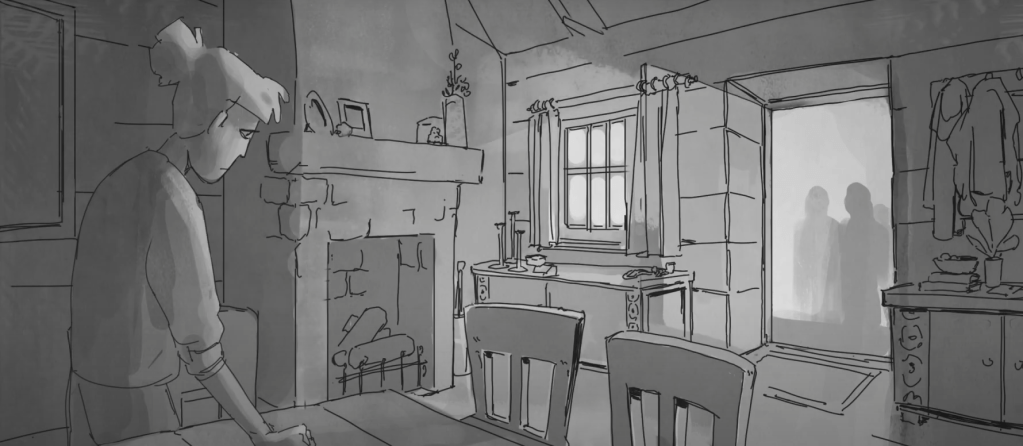
octo quest
Genre: Adventure game
Reference game: Tunic
Language: c++
This was a short project were time management and efficiency was essential. Despite the tight schedule, we were able to create a fully functional game by focusing on key systems and collaborating closely as a team. As one of the programmers, my contributions centered on animation blending, a UI system, and introducing important systems like the Post Master and State Manager.
my contributions
Animation blending
I implemented animation blending to ensure smooth transitions between different character states. This was key in making the character movements feel fluid and natural. I also used lerping techniques to seamlessly blend between animations, improving the overall quality of the game’s visuals.
Linear interpolation of the bones
To interpolate between two animations, each bone’s transform is decomposed and blended using Lerp for position and scale, and Slerp for smooth, distortion-free rotation. The components are then reassembled into the final bone transform.
This can be used to blend two animations simultaneously or to transition between animations as I did in Octo Quest.
for (size_t i = 0; i < skeleton->Joints.size(); ++i)
{
    auto& firstAnim = myAnimationPlayersMap[myCurrentAnimation]->GetLocalSpacePose().JointTransforms[i];
    auto& secondAnim = myAnimationPlayersMap[aNextAnimation]->GetLocalSpacePose().JointTransforms[i];

    const Vector3f T = Vector3f::Lerp(firstAnim.GetPosition(), secondAnim.GetPosition(), aInterpolationValue);
    const Quatf R = Quatf::Slerp(Quatf(firstAnim), Quatf(secondAnim), aInterpolationValue);
    const Vector3f S = Vector3f::Lerp(Vector3f(1, 1, 1), Vector3f(1, 1, 1), aInterpolationValue);

    Matrix4x4f result = Matrix4x4f::CreateScaleMatrix(S)
        * R.GetRotationMatrix4x4f()
        * Matrix4x4f::CreateTranslationMatrix(T);

    localSpacePose.JointTransforms[i] = result;
}

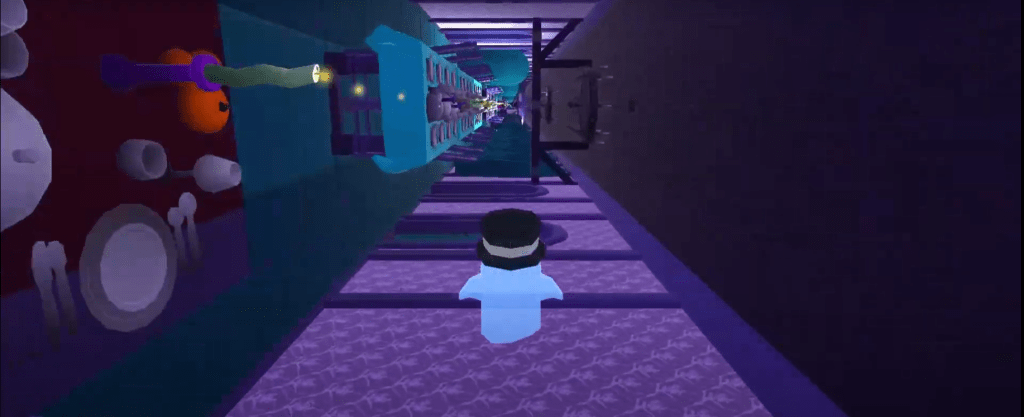
Beast
Genre: Platformer
Language: c++
First time making a game with c++
This was my first time making a game in C++. I was eager to apply what I’d just learned in a course on “Video Game Design Patterns. The project was one of the most challenging things I’ve ever done. When I started school, I had only taken an introductory C# course and had never programmed before. Going from that to working in the TGE engine—without all the features of something like Unity—was a complete game changer.
Through this experience, I discovered how much I enjoy working with systems and structure. Collision handling, though… not so much. Now I fully understand why libraries like Jolt and PhysX exist, and I have a deep appreciation for them. But for simpler cases, rolling your own solution kind of works.
my contributions
listener pattern
Post master class
Here is a straight forward way to make a post master, as a singleton because the post master, wich is the Observer in a listener pattern is a good example were it make sense to make it a singleton. Both the enemies and the player used the post master to send and recieve messages from the eachother and the world state.
class PostMaster
{
public:
	PostMaster(PostMaster& aPostMaster) = delete;
	void operator=(const PostMaster&) = delete;

	static PostMaster* GetInstance();

	void Subscribe(const eMsg aMsgType, Observer* aObserver);
        void UnSubscribe(const eMsg aMsgTypem Observer aObserver);
	void SendMessage(const Message& aMessage);

private:
	PostMaster();
	~PostMaster() {};

	std::vector<std::vector<Observer*>> myObservers;
};
Observer class
is an abstract class that your game objects can inherit from. So for example, if Player inherits from Observer it can use the Post Master to send and recieve messages. The Recieve function is were we handle incoming messages.
#pragma once
#include "Observer.h"

class Player : public Observer
{
public:
	Player(int aHp);
	~Player() {};

	void LoseLife();
	void Resurrect();
	void Attack();
	void Recieve(const Message& aMsg) override;

private:
	int myMaxHp;
	int myHp;
	int myPoints;

};
Enemies
A major focus of my work was enemy behavior and their interaction with other game systems. Initially, enemies were static and only damaged the player on contact. As development progressed, we started with simple movement patterns—having enemies patrol back and forth—before introducing a more advanced system where they would detect and chase the player. Instead of dealing constant contact damage, we implemented a timed attack system using colliders that activated at the right moment. To enhance combat feedback, we also added a knockback system, making interactions with enemies feel more dynamic. Additionally, I introduced the Post Master pattern to the project, which allowed for efficient event handling—such as triggering damage effects when the player was hit or removing enemies when defeated.

Another challenge was maintaining an acceptable framerate. I developed a simple system to limit draw calls. The system checked each object's distance from the camera and rendered only those close enough which worked surprisingly well. Additionally, I tackled technical challenges such as adjusting the rotation of imported Unity models.
ghost run
Genre: Endless Runner
Language: c#
Engine: Unity
lessons from agile development
SCRUM is widely used in game development for its agility—delivering testable versions of projects at the end of each sprint and refining the project based on feedback. This required us to adapt frequently.

The first sprint was challenging, as it was for many of us our first time developing a game, and our goals were overly ambitious. However, SCRUM helped us adjust in the next sprint, with more realistic goals and better planning. Daily standups kept communication clear. The agile approach allowed us to make steady progress despite the hurdles.

By the end, I had gained a solid understanding of agile development and how to work efficiently within a SCRUM framework. The project came together well, and it was a lot of fun!
art
invite you to explore a collection of my artworks. Take in the present and enjoy a bit of psychedelic beauty and eeriness.
All knowing flower field
One Sunday, after months without drawing, I felt restless and bored. I was tired of studying, tired of playing games, I didn’t really want to draw either, but I opened my laptop anyway and plugged in my drawing pad. I started with simple lines and a grid pattern, letting the symmetry tool guide me. Eyes and flowers appeared, almost by accident. I’ve always loved both, but there’s certainly something creepy about eyes floating without a body—unnervingly beautiful. It felt like the perfect combination.

solar punk utopia
Clean fresh air, sunshine, plants, life, sexy robots, and friendship. What’s not to love about it?
I drew this when I was tired of all the negative media and the video games set in dystopias filled with war or corruption. I love those stories, don’t get me wrong, but I was inspired to create something light and hopeful.

Selection of oracle cards



about
Linnea Lager
c++ game Developer based in Stockholm, Sweden
If it’s creating something in code or with yarn and needles, I love finding new ways to make things!
resumé
Hi there! I’ve always been fascinated by the world around us, especially the small details and am therefore not one for a fast-paced lifestyle. I enjoy taking my time and diving deep.
C++ is my main language, and it’s the first one I’ve really learned during my studies at The Game Assembly in Stockholm. While I enjoy graphics programming a lot, I consider myself a generalist and find every aspect of programming both fun and frustrating in its own way.
Outside of coding, I enjoy nature, especially looking at insects and bugs.
I also love video games, Project Zomboid with friends, Bloodborne, Classic Halo, and a ton of indie titles. Old-school shooters like Half-Life also holds a special place in my heart.
When I’m not gaming, I’m often drawing or knitting – both hobbies that are relaxing to me.



 Linnea Lager